The simplest way to get booked
Share one link. Clients pick a time from your live availability. Confirmations go out on their own. No email thread, no double booking.
- Every feature included
- No booking limit
- Works in 11 languages
How it works
Three steps to a booking page that works without you
Set it up once. Take bookings around the clock, with no email exchanged.
-
Create your event types
Define what you offer: duration, location, custom questions, and the hours you are actually available.
-
Share your booking link
You get a public profile at /yourname. Put it in an email signature, a bio, your site, or embed it.
-
Clients book. You get notified.
Bookings land in your dashboard and on your calendar. Confirmations, reschedules, and cancellations handle themselves.
What your clients see
Booked in three taps, from any device
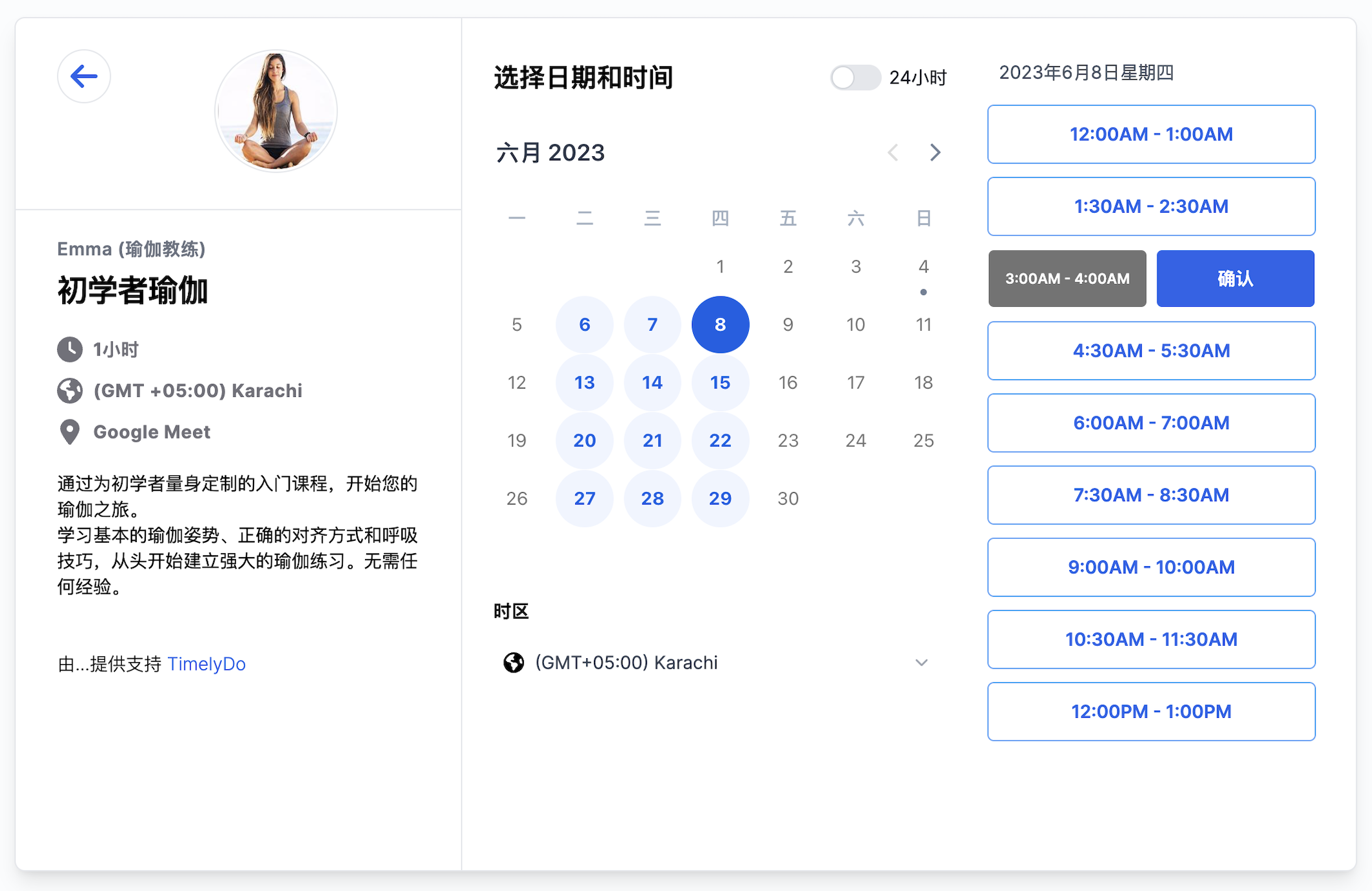
Your visitor picks a day, picks a time, and confirms. They never create an account. You get the booking, the calendar entry, and the notification.
- Only shows times you are genuinely free
- Every time shown in the visitor timezone
- Works the same on phone, tablet, and desktop
Available times
What you get
Everything your scheduling workflow needs
Four parts, each doing one job properly.
Built for
However you get booked
Works with your stack
Connects to the tools you already run on

Need something else? There are webhooks and an API key on every account. See the integrations
Two factor authentication
Add a second step at sign in from your security settings. Any authenticator app works, and backup codes get you in if you lose your phone.
Your data is not for sale
We never sell personal data to third parties. It is used to run the service and nothing else.
GDPR compliant
Lawful processing, full rights over your data, and access or deletion requests honoured promptly.
Nothing is locked in
Disconnect a calendar whenever you want, or ask us to delete your account and everything in it.
Read the full privacy policy and terms.
Free. Forever.
Every feature, no booking limit, no card. Timelydo is free for individuals. We plan to charge organisations, and that plan is not out yet.
Get started freeTeam and organisation plans are coming later.
What is included
- Connect Multiple calendars
- Create unlimited events
- Active unlimited events
- Get meeting notifications via email
- Invitee can select the location
- 将Timelydo 添加到您的网站
- Customise your booking page
如果您找不到所需信息,请发送电子邮件给我们的支持团队,我们会尽快回复您。
如果我使用Timelydo,我的受众如何安排会议?
通过Timelydo,您可以创建和配置预订页面,与您的受众分享以开始接收预订。您的受众将能够安排时间并通过预订页面填写表单收集任何信息。
我可以删除我的账户并删除我的个人数据吗?
是的,您可以联系我们请求删除您的组织。此外,预订数据可以按照滚动的X天计划进行删除。
是否可以链接到特定成员或会议类型?
Timelydo 提供直接链接到单个会议类型或预订页面的功能。
一旦有人预订了与我们的会议,会发生什么?
预订成功后,它将在您的Timelydo会议仪表板和电子邮件日历中生成新的事件。您将收到包含预订数据的电子邮件确认,与会者也将收到包含会议详情的电子邮件通知。如果其电子邮件地址支持,还将向他们发送自动生成的电子邮件日历事件。
Timelydo是否能够支持我每周的时间安排更改?
当然可以!您可以根据您精确的可用时间创建自定义日程安排。
我可以安排具有多个参与者的群组会议或课程吗?
Timelydo 支持安排具有多个参与者的群组会议的选项。这对于安排课程、群体培训等非常有用。
您连接的在线会议软件是哪些?
目前,我们支持与面对面会议、电话呼叫、Google Meet、Zoom(可选)和邀请咨询等进行连接。这些集成是免费提供的。
我可以将我的预订页面翻译成其他语言吗?
是的,您可以将预订页面翻译成不同的语言。请访问此页面查看可用的语言。
我如何防止人们预订但不出现?
Timelydo 提供确认电子邮件和日历事件,无论何时有人注册预订,您和与会者都会收到通知。此外,您可以安排在会议前发送电子邮件提醒。
如果需要,取消或重新安排会议是否方便?
Timelydo 提供取消和重新安排工具,可在您的仪表板、电子邮件日历事件详情和电子邮件日历中轻松采取行动。
我可以一直使用Timelydo的免费计划吗?
是的,Timelydo 目前不限制用户在免费计划上的使用时间长度。但是,这个政策可能会在将来更新。
当安排会议时,双方都会收到确认电子邮件吗?
是的,确认电子邮件将发送给与会议类型相关的所有团队成员和预定的参与者。电子邮件将包含与会议相关的信息,如时间和地点。
Ready to stop the scheduling chaos?
Replace the email thread with one booking link. Free to start, no card required.
Free for individuals. No card required.